
User interface models, particularly with AI prototyping, are one of the quickest way to gain buy in, to get stakeholder feedback and to help business stakeholders engage in the requirements process.
I’ve been using user interface models since my very first days as a business analyst and but the AI tools we have available today are making them even easier to build and iterate and almost an indispensable part of your business analysis practice.
User Interface Modeling: The Fundamentals
A user interface is means by which a human user like you and me interacts with a piece of software. Could be on our phones, it could be on our computer, and it’s what we actually see and use. You are using one right now as you’re watching this video or reading this blog post.
In business applications, a user interface often includes multiple screens that provide options for the user to find information and to take action. And basically it’s just what you see when you interact with a piece of software. Now a user interface model represents what that user interface could or should look like.
User interface models are a great accompaniment to use cases, user stories and any other text based way of articulating requirements like a functional requirement specification, software requirement specification, or any other textual model.
A Mock-Up is a Low-Fidelity Static Representation of a User Interface Model
A mock up is a low fidelity static representation of a screen and often represented as a hand drawing. These are most useful during discovery and initial analysis.
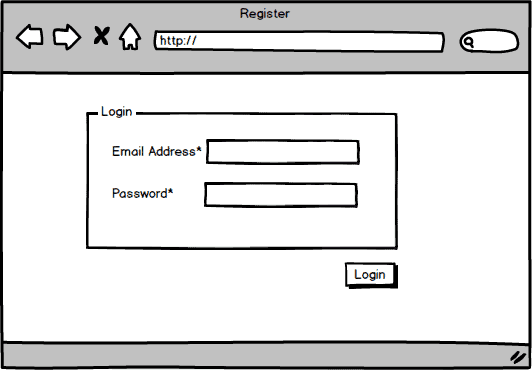
You can create a mock-up in a tool like Balsamiq or you can create it on a whiteboard or on a flip chart or even just a shared piece of paper on the screen that you share on a desk. And although it’s simple, right, it could generate some really good feedback like why is there not a remember me box? And what about a forgotten password feature?
These are tools to inspire a conversation and to get people thinking about what they would want to see on a screen, which is a way that they think about how to actually communicate what Their requirements are for the software.
A Wireframe Fills In More Functional Details
A wireframe is a medium-fidelity representation of a screen that answers more questions and fills in more details.
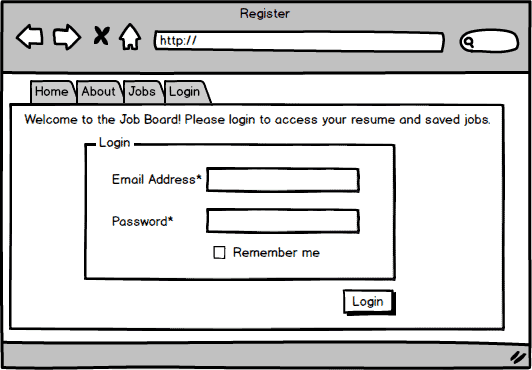
As you can see from this example, we start to get information in the right place and more clarity perhaps on the navigational element.
Here’s a more in-depth tutorial on wireframes specifically.
A Rendering Clarifies Visual User Interface Requirements
A rendering shows not just what’s on the screen and how it might be laid out, but what are the colors, the fonts, the graphics, and you need to be specific about those as part of the user interface requirements.
A rendering might be created in Photoshop or in HTML as a mockup or as a dubbed out HTML, not a functional HTML, but it would show more precisely exactly where everything goes and exactly what it’s going to look like on the screen. A rendering is less about the functionality, more about the look. Wireframes and mock ups that we talked about are more about the functionality, not really at all about the look.
A Prototype Provides Click-Through Functionality
A prototype allows a stakeholder to click-through the screens to simulate using the system. It could be created in stubbed out code. I myself have created these in drag and drop tools that allow you to build a prototype without having any coding experience and so you could create canned responses.
So when a user clicks on a button, they go to the right screen and they get to see kind of what that flow is like, even though you know there’s no functionality behind it and no data is getting saved. But they can experience that user interface and can get some better feedback as a result.
And, again, AI prototyping, can accelerate the process.
Simulations Can Run Through Sample Scenarios with Data
A simulation is a functional prototype that can run through multiple sample scenarios. You often can load in data and it shows the implementation of business rules.
So if I have this piece of data, this thing happens and you start to stub out various scenarios. This can be useful for really tech resistant stakeholders that really need to see the workflow partially implemented part before it’s actually built. Again though, with both prototypes and simulations, this is the kind of thing now we can do with AI. So let me show you an example of that.
AI Prototyping Accelerates the Process
Finally, an AI prototype is a click-through prototype created using a vibe coding tool. In the video, I show an example of AI prototyping I did using a tool called Lovable to web-enable a sign-up process for a local company that was currently doing all of their sign-ups through email.
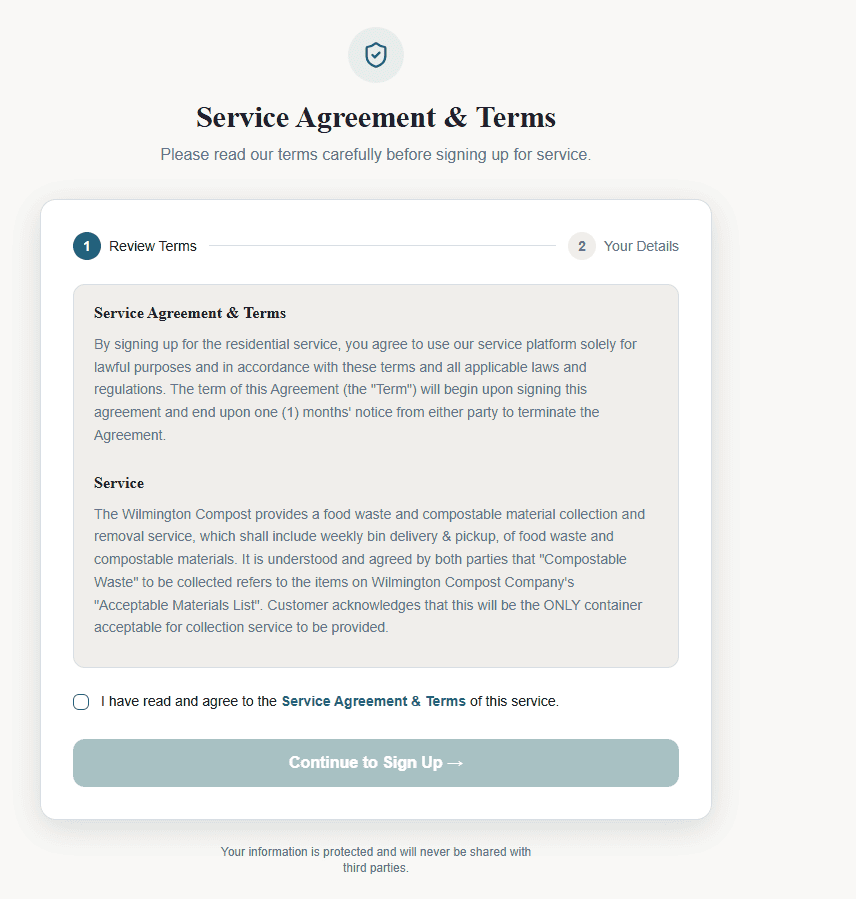
They wanted to be able to put that on the web so people could sign up independently and we needed to work through all the business rules of how that would look and also what would the logic be so that they wouldn’t have a lot of signups that they couldn’t actually fulfill on.
Instead of having to figure out what to put on a screen and how to implement each function, what I did was give a text based prompt of the key pieces. This entire prototype started with this prompt:
Please create a prototype for a local service sign-up that has the following:
Page 1 – presents a bullet list of terms and conditions (for now, as lorem ipsum text) a check box with to agree to terms and conditions. A button to submit
Page 2 – upon submit A form with name, pick-up address, billing address, payment details A sign-up now button
The user is able to click that they’ve read the terms and conditions and then see the sign-up page. Here’s page 2 of the AI prototype:
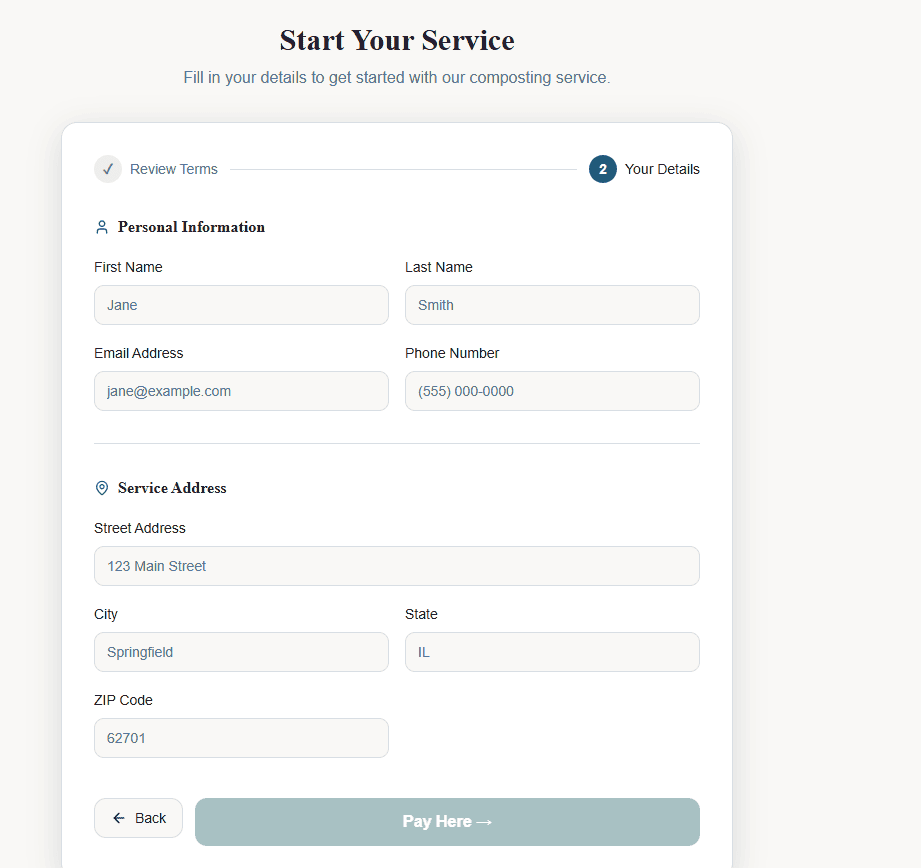
I even built in logic so that if you put in a zip code and it doesn’t match the service area then you get an error message.
From Business Process to AI Prototype
The AI prototype came right from the business process work I’d already worked through with the business stakeholder. I had the prototype created based on this initial prompt and then continued to make updates. Then I walked through the prototype with the business user. It’s still a very medium fidelity, but a functional prototype that you could use and play with.
Then, inside the review meeting, I was keeping tabs of the things that she wanted to have updated and typing them into the prompt screen. Once we completed the review and walked through the updates, I asked Lovable to update the prototype with those updates. We were able to look at a second version right then and there.
Compressing Meeting Timelines with AI Prototyping
Historically getting to this point of validation would have meant taking those notes, scheduling another meeting. Often we have to wait a week, maybe two weeks to get on a stakeholders calendar and then making those updates and presenting it again to get feedback, in which case everybody has to remember where they were at and where things got left off.
With AI prototyping, we can start to do these things in real time so that we’re compressing that cycle. And we’re getting that feedback loop right away.
This is the next level and the next space that business analysts need to lean into when it comes to how we interact with our stakeholders and collaborate around the requirements.
And on top of that, I will say there are business analysts today building prototypes like this inside meetings. So not just doing the updates, but actually building the prototype as they’re listening, keeping a log of what the what’s being requested, having AI build a prototype and using that to get a feedback loop.
So again, just a great technique to compress timelines as well as get stakeholders more engaged and show we’re really listening to you. You end up with this deliverable at the end of the meeting. It’s an exciting thing to see and it improves engagement.
Go Deeper on AI Prototyping, User Interface Modeling, and Software Requirements Analysis, in The Business Analyst Blueprint® Training Program
So I go a lot into a lot more depth on user interface modeling generally, as well as rapid prototyping with AI and all aspects of discovering, analyzing and validating the software requirements inside The Business Analyst Blueprint® training program.

Your Next Steps to Experiment with AI Prototyping and User Interface Modeling
-
- Start with a mockup on paper or a whiteboard. Sketch the key screens during your next discovery session and ask stakeholders what’s missing, such as a “remember me” option or a forgotten password link.
- Move to a wireframe once the details settle. As questions get answered, refine the layout and navigation so the screen structure is clear before anyone worries about colors or fonts.
- Build a clickable prototype with AI for your highest-risk flow. Pick the one process where a misunderstanding would be most expensive, write a text prompt based on the business rules you’ve already documented, and generate a working click-through version.
- Iterate live with stakeholders. Bring the prototype into your next review, log requested changes as they come up, and ask the AI tool to update the version before the meeting ends.
- Validate the business rules with the prototype, then write the requirements. Use the feedback to confirm the rules, such as zip code validation, and capture them in your requirements documentation so they get built as intended.
More Stakeholder Engagement Tips
Looking for more ways to engage stakeholders. Check out this video with my top 10 tips for engaging stakeholders: